
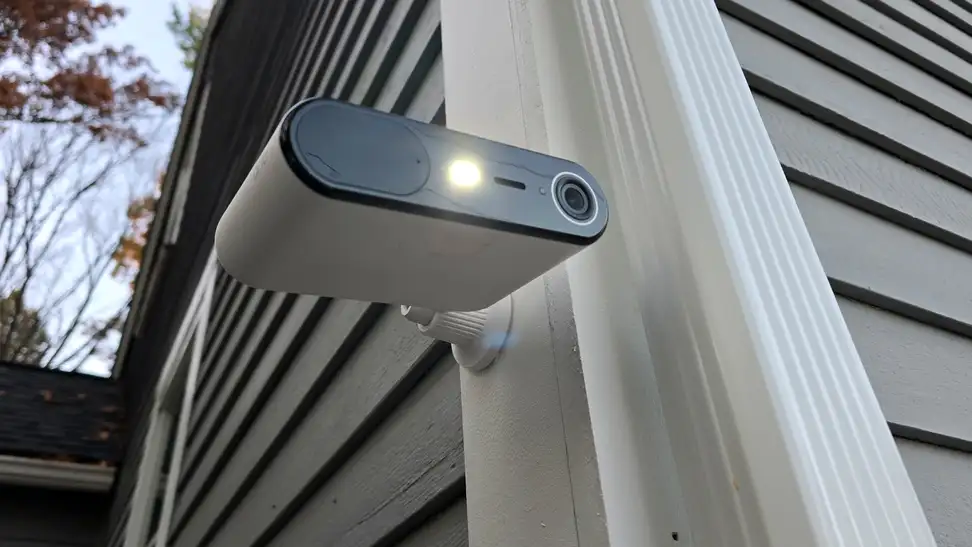
Arlo Essential Solar Security Camera Review
This solar security camera wants you to forget it needs charging at all—even on dark winter days

If you're on the hunt for an outdoor security camera that can keep an eye on your home day or night, the Arlo Essential Solar Security Camera (available at Amazon for $99.99) has you covered. As the name implies, it just needs a wireless connection and sunlight to keep going, eliminating one of the bigger pain points of installing your own outdoor cameras. It may not be for everyone, but if you have a home and need cameras, this one might be perfect for your situation.
-
About the Arlo Essential Solar Security Camera
-
How we tested
-
What we like
-
What we don't like
-
Warranty
-
Should you buy the Arlo Essential Solar Security Camera?
-
Related content
Pros
-
Solar-powered
-
Easy installation
-
Strong color night vision
-
Detailed AI alerts
-
Free live view and motion alerts
Cons
-
No onboard storage
-
Subscription needed to save footage
-
Solar-only power
-
24fps motion blur
About the Arlo Essential Solar Security Camera
- Video resolution: 2K at 24fps
- Field of view: 130° diagonal; 12x digital zoom
- Night vision: Color, via an integrated white LED spotlight
- Motion detection: PIR sensor with a 110° horizontal detection range
- Power: Integrated 1.2W solar panel + 14,790mAh rechargeable battery
- Battery life (Arlo estimate): About two hours of daylight a day keeps it charged; up to six months on a full charge with no sun
- Audio: Two-way audio; remotely triggered siren
- Connectivity: Dual-band Wi-Fi (2.4GHz and 5GHz)
- Weather resistance: IP65
- Smart home: Amazon Alexa, Google Home, IFTTT, SmartThings
- Subscription: Smart object recognition (people, vehicles, packages, animals) requires an Arlo Secure plan, featuring three paid tiers—Smart Aware, Smart Secure, and Ultra Secure—starting at $9.99 per month
- Storage: No onboard storage
- Colors: Black or white
- Price: $99.99
How we tested
To put the Arlo Essential Solar Security Camera through its paces, I installed it outside my home for about a week, letting it run continuously and charge from the sunlight. I tested it in New England in October, so the sunlight was weaker than it would be elsewhere or at other times of the year. As a regular customer would, I picked the spot that was most convenient for me, far from any power outlet. That spot still gets four to five hours of sunlight on a typical day, which is enough to keep the battery between 50% and 75%. If you pick a spot in the shade, you may need to detach the camera to charge it more regularly.
What we like
Solar-powered operation gives you far more placement options—and installation is easy
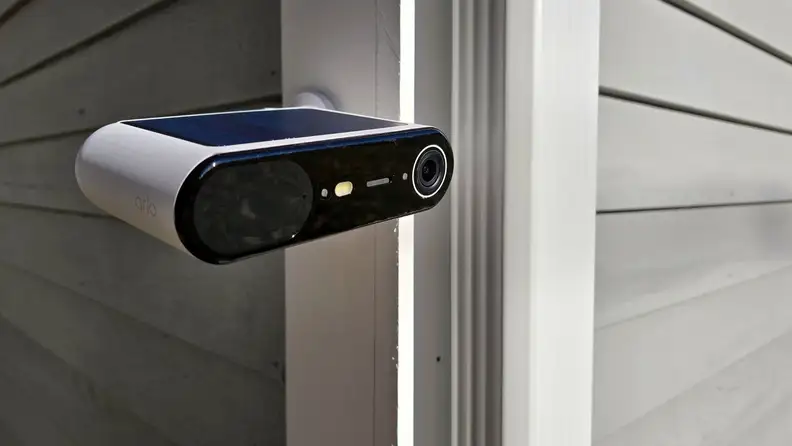
A solar panel built into the top of the camera takes the outlet out of the placement equation.
The most difficult part of placing an outdoor security camera is power. With a halfway-decent router (I use a mesh router to ensure consistent, high-quality coverage), most security cameras can get the footage to your phone without a problem. But keeping the camera powered on typically means either taking it down regularly to recharge the batteries (a chore you'll likely forget or put off) or connecting it to a power source.
If you want to put a camera somewhere far from an existing outdoor outlet, you need to run a long extension cord, draw power from a light bulb, or have a new outlet installed. Solar-powered cameras still come with some placement anxiety—some spots don't get enough sunlight to keep the camera powered up—but they open up more options.
And because you don't need to worry about running a long cable, installation takes five minutes. Just pick a spot, screw in the baseplate, and attach the camera. As long as you angle it to catch the sun and it can get a Wi-Fi signal, you're all set.
The app is slick and easy to use, with great notifications
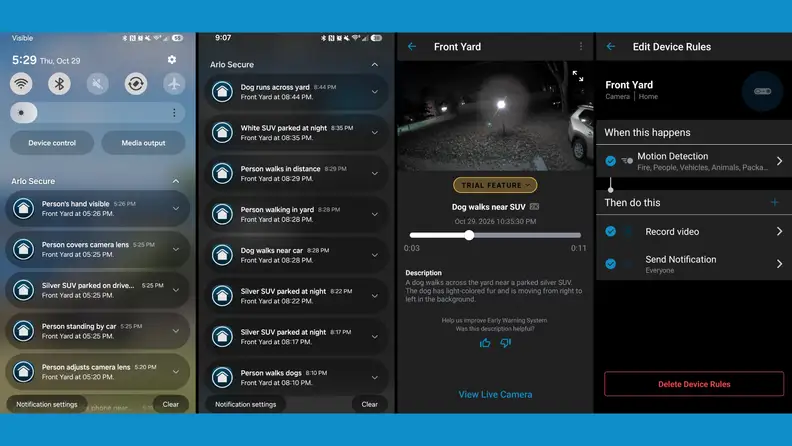
Short AI-written summaries help you decide whether an alert is worth opening.
Outdoor security cameras are similar hardware-wise, with the real separation often coming from software features, how well the apps perform on your phone, and how much it costs to access certain subscription features.
The Arlo app offers a solid set of free features (live view, motion alerts, two-way audio, spotlight and siren control, schedules, and Alexa, Google Home, IFTTT, and SmartThings integration), and notifications appear on your phone within 60 seconds. But the smartest features sit behind Arlo's subscription (cloud recording with 60 days of history, AI detection of people, vehicles, animals, and packages, activity zones, and Arlo's Early Warning System and AI event summaries).
The event alerts are much more detailed than those from other camera apps, likely due to integration with large language models. While some alerts are standard (motion or vehicle detection), most add details like "woman removing bag from gray SUV" or "man walking dogs near trunk of car," so you can tell what the alert is about without opening the video.
The biggest catch is that the Essential Solar has no onboard storage, so without a plan, it doesn't save footage for later review—it just alerts you to check the live feed and hope something is still there. For most people, that makes the Smart Aware plan effectively mandatory. It costs $9.99 a month for one camera ($95.88 billed annually) or $19.99 a month for unlimited cameras ($215.88 annually), so your first-year cost goes from $99.99 to about $196. Pricier tiers add professional monitoring (Smart Secure, $29.99 a month) and continuous recording on select cameras (Ultra Secure, $49.99 a month), but most Essential Solar buyers won't need either.
The footage is high quality enough to know what's going on
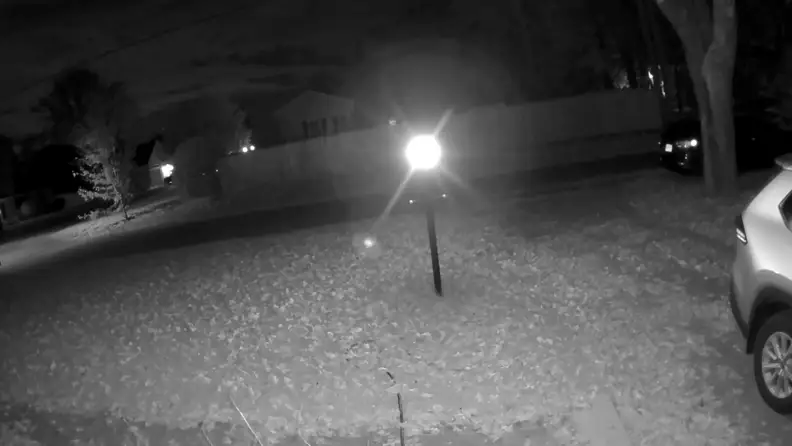
Alternate: Nighttime detail holds up well enough to tell what’s parked where, though a bright lamp washes out a bit of the frame.
Most outdoor security cameras offer some night vision and serviceable daytime video. The Arlo Essential has strong night vision, letting you see people, animals, and vehicles even without additional outside lights—its onboard spotlight fires up to enable color footage at night.
While I'd always recommend motion-activated floodlights and other deterrents around your home, it's impressive that the Arlo can produce such a clear image in limited light. Our area has had a spate of break-ins recently, and my existing security cameras have caught several suspicious vehicles driving around. Unfortunately, while I can make out the type of vehicle (sedan, wagon, truck, etc.), the color is hit-or-miss, and the license plates are impossible to read—though that was true of Arlo's 2K, 24fps video as well.
The Arlo captured certain features, like vehicle color and shape, more cleanly. Though the 24fps video means motion tends to blur (especially cars), it still outperformed the cheaper $50 cameras I have all over my home.
What we don't like
Solar power comes with trade-offs
The solar cells on top of the Arlo Essential Solar power the camera, and that's its only power source once it's mounted (of course, you can take it down to charge the battery via USB-C). There's no easy way to wire it up to a constant power source, and if you do, you can't remove the solar bits.
Some cameras offer optional solar panels that you can place a short distance from the camera to get the best power, even if that isn't the best viewing angle.
The subscription pricing is reasonable, but there are cheaper options
The lack of onboard storage (or a memory card slot for local storage) means you must subscribe to a cloud storage plan, called Arlo Secure. Within this, there are three tiers—Smart Aware is the base plan, starting at $9.99 per month for one camera, and you can upgrade to either Smart Secure or Ultra Secure, each including unlimited cameras and costing $29.99 and $49.99 per month, respectively.
On the base Smart Aware plan, you're paying $9.99 a month for the camera (or $19.99 a month for unlimited cameras), which is much higher than other companies like Wyze, which offers Cam Plus for $2.99 per camera or $9.99 a month for all cameras. However, you have to step up to Cam Unlimited Pro to match Arlo's 60-day cloud storage, at which point the price is the same: $19.99 a month for all cameras.
If you want professional monitoring, Arlo offers the Smart Secure plan, though it requires the Arlo alarm. Arlo's plans also stop short of what SimpliSafe offers; the company says its agents actively monitor and intervene when they detect a problem.
Overall, the Arlo is a good middle spot between the professional monitoring world and the purely budget-friendly smart camera world. Depending on which features you're most attracted to and how many cameras you need, each company likely has something for you.
Warranty
Per Arlo, the Arlo Essential Solar Security Camera comes with a limited hardware warranty that lasts one year from the date of purchase. It covers defects in materials and workmanship under normal use. Some components, such as batteries or mounts, may have different warranty periods. The warranty applies only to the original purchaser and isn't transferable.
Should you buy the Arlo Essential Solar Security Camera?
Yes, if you want a strong pairing of security without full system costs
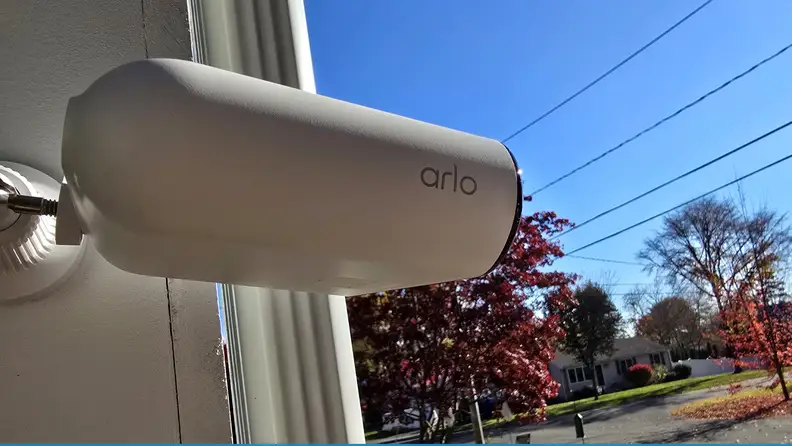
Easy to install and cord-free, the Essential Solar suits spots far from an outlet, as long as you factor in the subscription.
As a homeowner with nine (yes, nine) cameras permanently installed around my house, I know the value of keeping an eye on things when I'm away from home. But there are so many options on the market today to appeal to different buyers. The Arlo Essential Solar Security Camera (available at Amazon for $99.99) strikes a strong balance between budget-conscious options on the market and more expensive systems that effectively serve as full security systems.
The Arlo Essential further expands your options by relying on solar power rather than recharging batteries or running wires to stay powered up. This lets you put a camera in places you might not otherwise be able to, like a post or tree that's far from a power source but close enough to receive a Wi-Fi signal. I installed it by my driveway, which has no power options within 30 feet, and it was the perfect spot to watch an area my current cameras struggle to see.
Once you're set up, the camera offers crisp pictures and audio in both daytime and nighttime. It has excellent AI-powered alerts, and the app is fast and responsive. Like most outdoor cameras, it requires a monthly subscription to get the most out of it, but at $19.99 a month for unlimited cameras, it's reasonable and provides 60 days of cloud storage. The subscription becomes even more tenable if you plan to invest in three or four cameras.
If you need to keep an eye on a part of your home that gets wireless internet and sunlight but has no nearby power source, this is among the best budget solar cameras I've seen. The price, ease of installation, and slick app all add up to one of the better outdoor security cameras I've used.
Related content
-

-
 The Best Smartwatches of 2026
 best-right-now
 review

Meet the tester

TJ is the former Director of Content Development at Reviewed. He is a Massachusetts native and has covered electronics, cameras, TVs, smartphones, parenting, and more for Reviewed. He is from the self-styled "Cranberry Capitol of the World," which is, in fact, a real thing.
Checking our work.
Our team is here to help you buy the best stuff and love what you own. Our writers, editors, and experts obsess over the products we cover to make sure you're confident and satisfied. Have a different opinion about something we recommend? Email us and we'll compare notes.
Shoot us an email